Redesigning Spotlight OMS for Operational Clarity
Redesigning an internal OMS around status clarity, search, and operational visibility for ops users.
60%
Agents refreshed manually just to see current orders.
context
Order Management System
Spotlight is OneCart's internal Order Management System — the tool agents, leads, area managers, and supervisors use to track live orders, monitor shoppers and drivers, handle exceptions, and intervene when things go wrong. Hundreds of orders per day, across multiple malls, all managed through this one system.
I'm the sole product designer on Spotlight. I work directly with the head of engineering and my PM, and present to business at each stage. Engineering raised the initial concern: the system was being pushed beyond what it was built for. Features had been added reactively over time and the UX hadn't kept pace. The interface was dense, the terminology was confusing, and agents were using it on their phones despite it being designed for desktop.
Rather than jumping straight to a redesign, I ran a heuristic evaluation and user survey to understand exactly what was broken and how badly. That research shaped every decision that followed. This is an active project. Some pieces are in development, others are designed and pending, and some modules are still ahead.
Problem
The system didn't update in real time
60% of surveyed agents reported refreshing constantly just to see current orders. 54% cited slow performance. The tool felt manual — agents were checking every few minutes instead of trusting the screen.
Search required too much precision
57% reported friction. Finding an order meant entering an exact order ID plus a specific date. No search by customer name or phone. Filters reset after viewing an order detail, so agents re-applied them every time they navigated back.
Status labels were confusing
The system merged two different types of information into one field. An order could show as “Completed Late” — but is “Completed” the workflow status and “Late” the attention flag? Or is “Completed Late” its own status? Agents had to mentally decode every label to understand what was actually happening and what needed their attention.
The order list was a wall of data
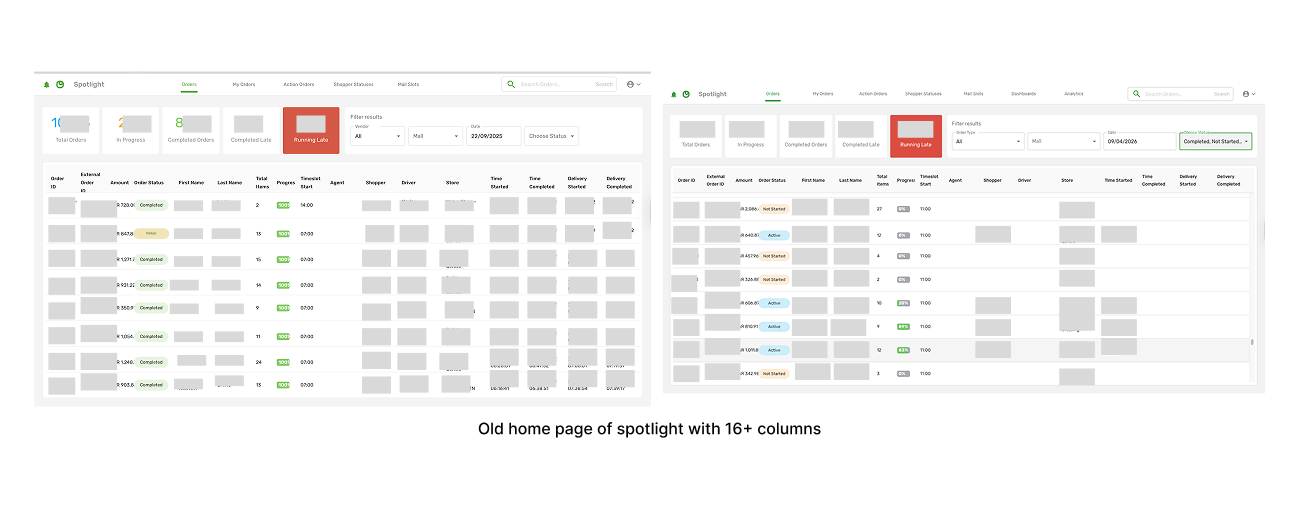
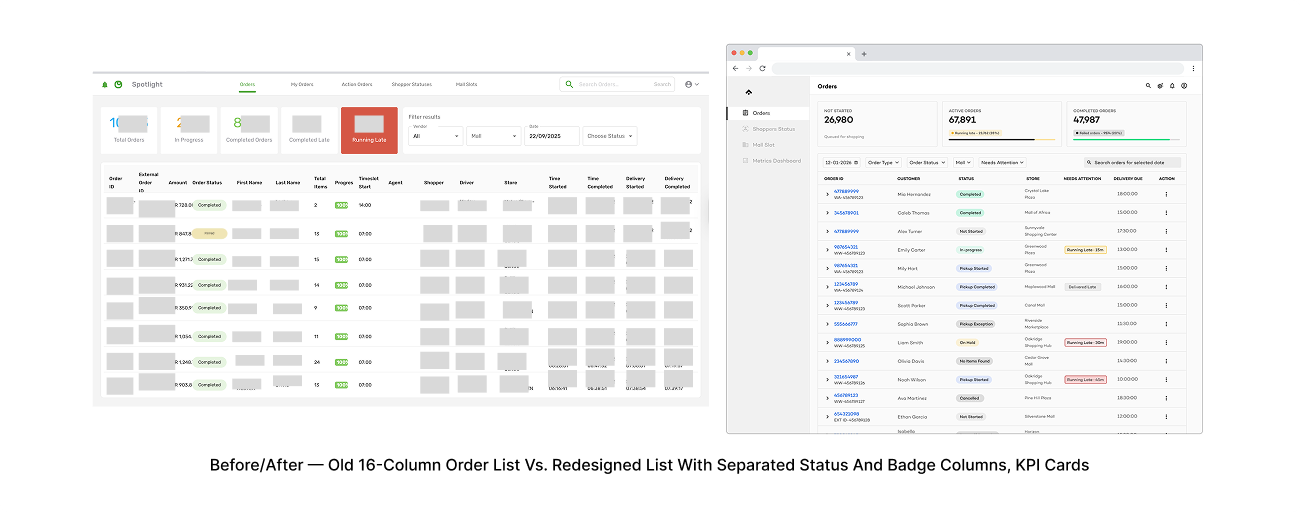
The most-used page in the system showed 16+ columns per order — Order ID, Amount, Status, Progress, Timeslot, Shopper, Driver, Store, multiple timestamps, and more. Nothing stood out. Critical information like “Running Late” had the same visual weight as a Store name or an External ID.
Actions were buried, safeguards were missing
“Assign to Me” was hidden inside order details. Cancel Order and Reset Order had no confirmation dialogs — a single click could trigger a destructive action with no undo. This was the worst thing we found.
All users saw the same interface
View-only users saw action buttons they couldn't use. Agents saw modules irrelevant to their work. No role-based filtering.
Constraints
Key Constraints
We had to work within the existing backend and API structure. Driver data comes from third-party delivery partners, limiting what we can surface. No baseline metrics existed. The system had to stay operational throughout the redesign — no “stop the world” migration. Agents were using a desktop-designed tool on their phones.
Research & Design Strategy
Heuristic evaluation
I evaluated all seven core modules using Nielsen's 10 heuristics plus criteria specific to Spotlight's operational context.
Critical (Severity 4): No confirmation for destructive actions. Cancel Order and Reset Order could fire accidentally with no undo.
Major (Severity 3): Overlapping status fields creating ambiguity. Key actions hidden in menus. UI didn't adapt to user roles. Workflow stages (shopping, handover, delivery) weren't clearly separated.
Minor (Severity 2): Non-intuitive module naming (“Action Orders” actually means completed/cancelled orders). 16+ column tables. Filter and search limitations. No contextual help anywhere.
User survey — 35 ops respondents
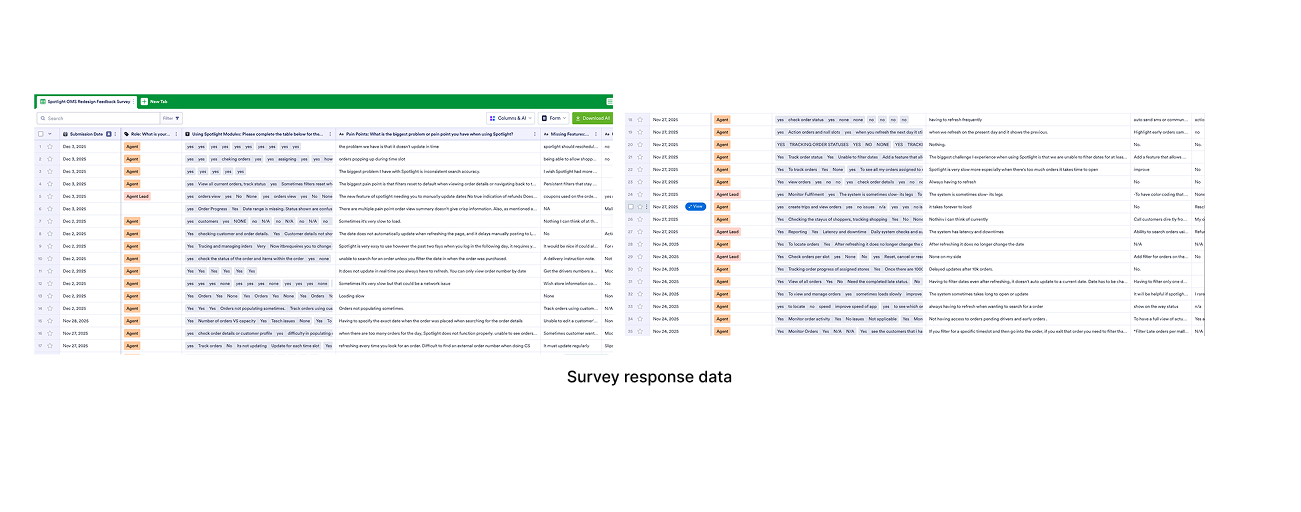
We surveyed 35 ops users (30 agents, 4 leads, 1 other). The results quantified what the heuristic evaluation had found:
60% reported needing constant refreshing just to see current orders: The system had no real-time updates — agents were manually refreshing every few minutes instead of trusting the screen.
57% experienced search friction: Finding an order required an exact order ID plus a specific date. No search by customer name or phone, and filters reset after viewing an order detail.
54% cited slow system performance: Load times and responsiveness were a persistent source of frustration across all roles.
40% flagged filtering limitations: No date range filtering, no persistent filters — agents re-applied their filters every time they navigated back from an order.
34% wanted communication tools like a call button: Agents had to switch between Spotlight and other tools to contact shoppers or drivers.
31% needed basic automation like auto-refresh: The system required manual effort for things that should have been automatic.
Strategy
- Fix the fundamentals first. Terminology, status visibility, search, role alignment — before any automation or smart features.
- Deterministic automation only. Auto-refresh, default to today's date, session-scoped behaviours. No auto-assignment, no escalation, no customer-facing notifications.
- Separate workflow progress from attention signals. “Where is this order?” and “Does this order need attention?” are different questions. The system has to treat them differently.
- Role-aware, not role-generic. Show each user what's relevant to their job.
What We Excluded & Why
- Auto-assignment of orders: Too high-risk without validated assignment logic
- Customer-facing notifications from Spotlight: Internal tool — customer notifications belong in customer-facing systems
- Escalation logic: Needs the clarity foundation first
- Full driver data integration: Third-party APIs still being negotiated
Solution
Status and Badge Separation
The existing system merged workflow progress and attention signals into a single status field. “Completed Late” looked like one status, but it was actually two pieces of information jammed together — where the order is (Completed) and what needs attention (Late). Agents couldn't quickly answer two basic questions: where is this order in its lifecycle, and does it need my attention?
I dug into the existing status system with the head of engineering. He walked me through what each status meant in the backend, and it became clear the system was conflating two distinct layers.
Status = workflow progress: Each order has exactly one status at any time: Not Started → In Progress → Pickup Started → Pickup Completed → Completed.
Badge = attention/risk layer: An order can carry multiple badges simultaneously: Late, Running Late (15/30/45 min), On Hold, Cancelled, No Items Found, Pickup Exception, Drop-off Exception, Driver Assigned, No Driver, Returned to Store, Refund Required.
Filter logic: Status filter shows workflow stage (all orders in progress). Badge filter shows attention need (all orders running late). Combined filter gives you the intersection (in-progress orders that are running late).
I proposed the separation and engineering agreed immediately. It had been a source of confusion since the system was first built.
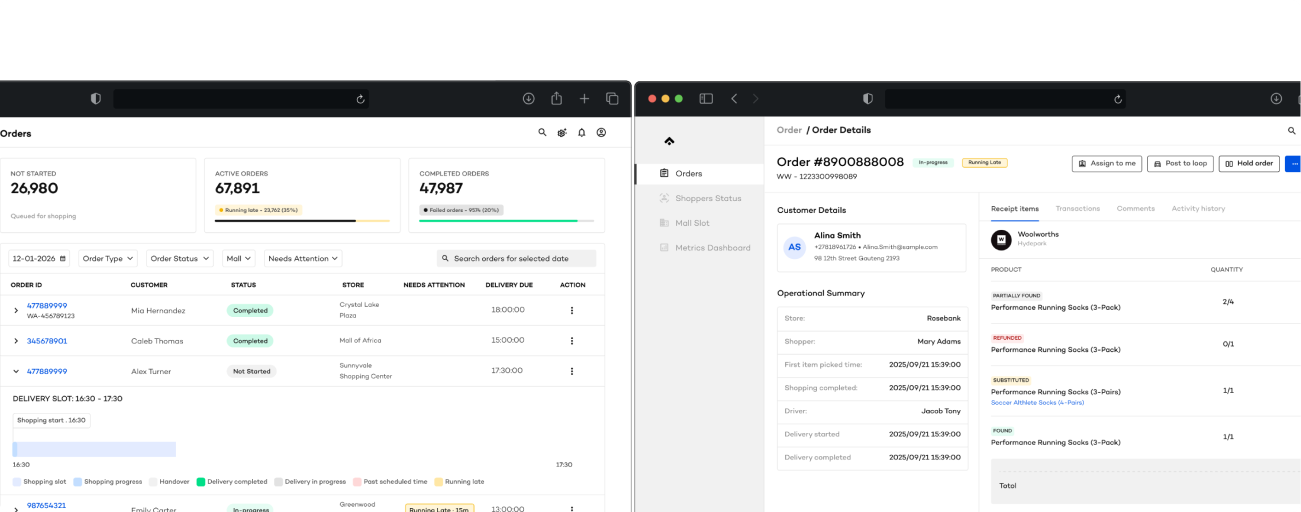
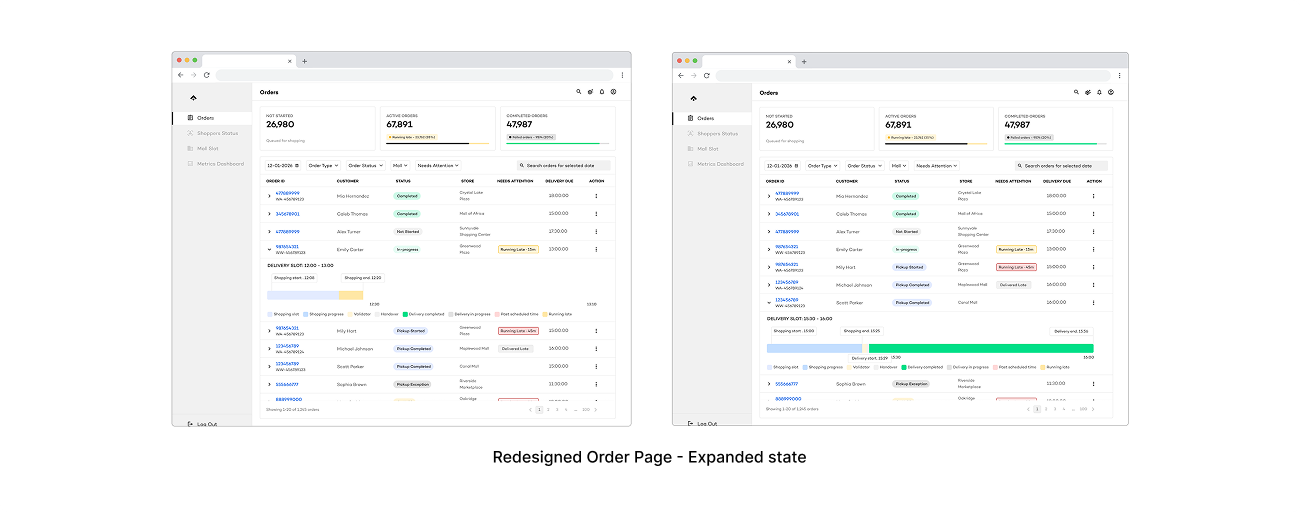
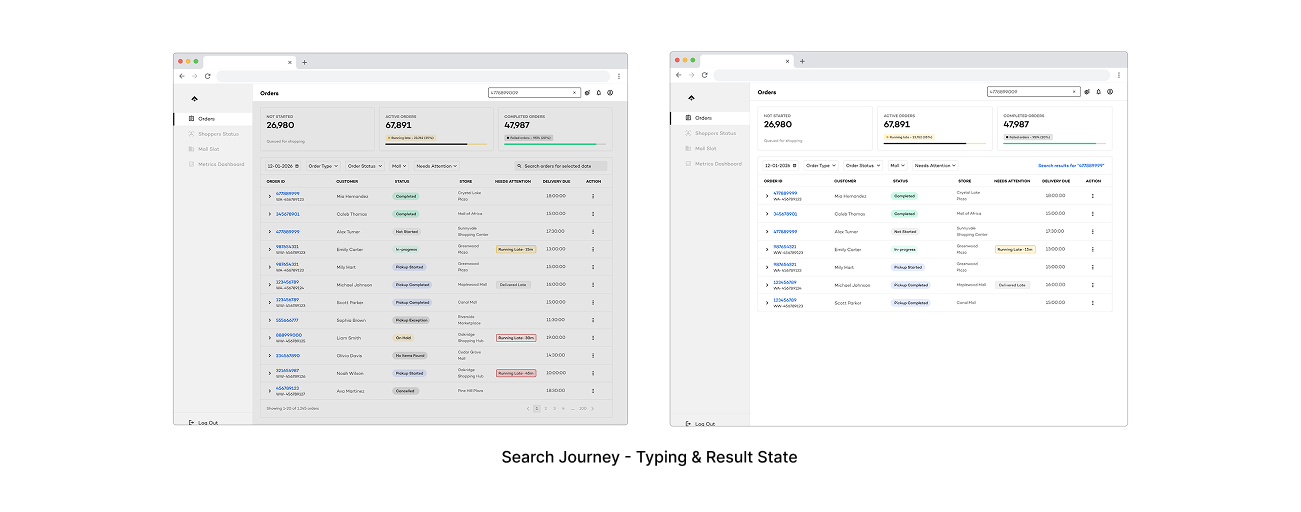
How this transformed the order page: Once status and attention were separated, the table didn't need 16+ columns anymore. The redesigned order page has a clean Status column, a separate Needs Attention column with badge chips (“Running Late · 15m”, “Delivered Late”), and KPI summary cards at the top showing Not Started, Active, and Completed counts. The page went from a wall of data to something agents could actually scan.
Search, Filter, and Automation Overhaul
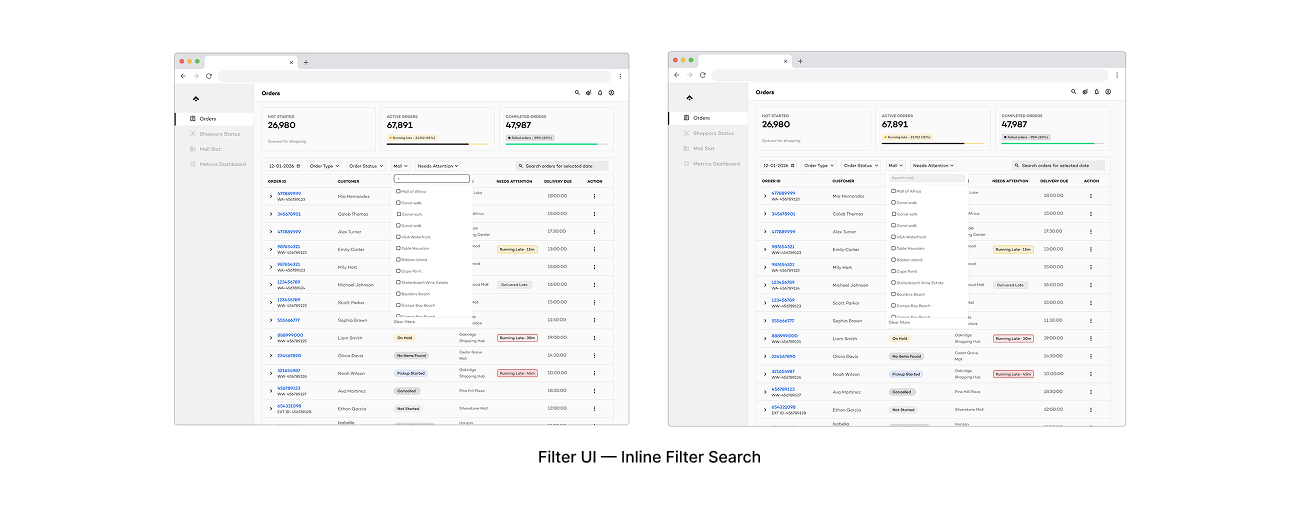
The filter experience was worse than the survey numbers suggested. There was no search within filters — agents had to manually scroll through long lists of options to find what they wanted to filter by. Combined with filters resetting every time you navigated to an order detail and back, even basic workflows became multi-step frustrations.
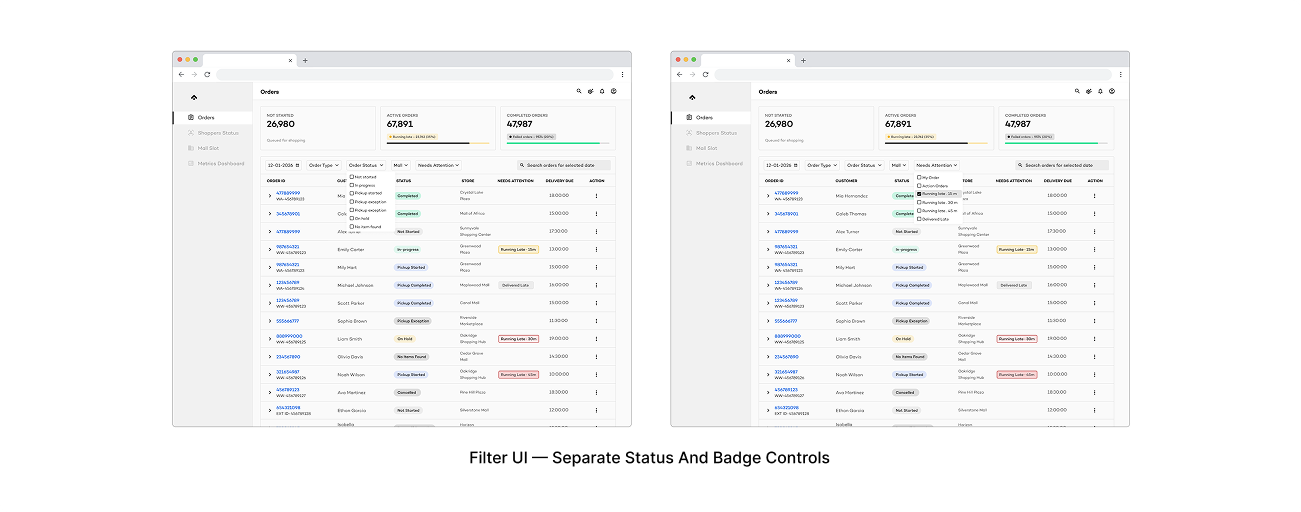
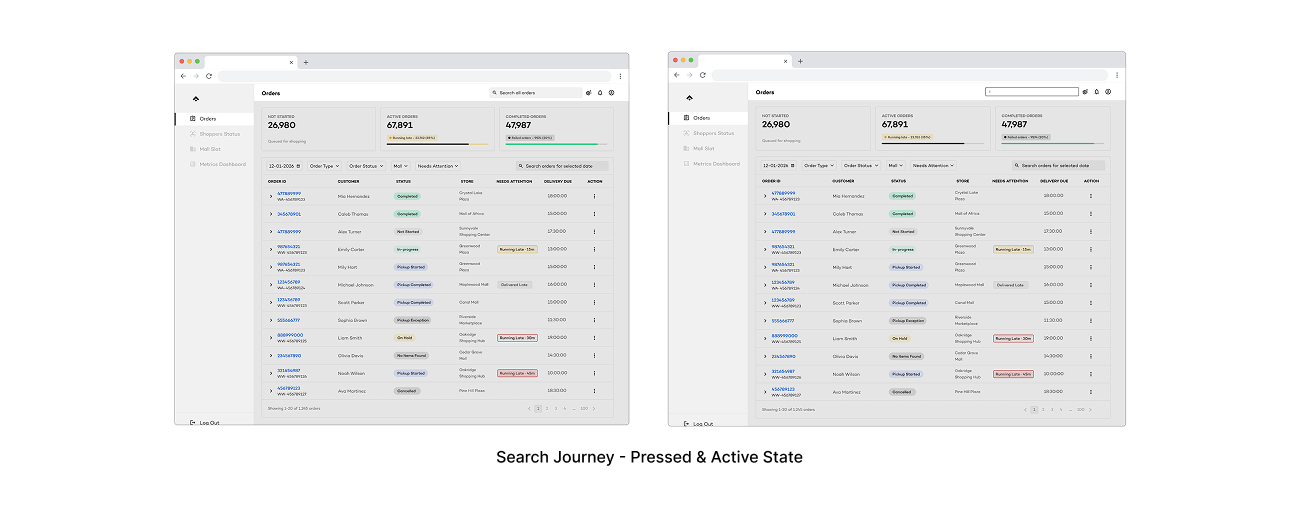
We redesigned search and filtering around the most common agent tasks. Search now supports lookup beyond exact order ID. Filters persist across navigation so agents don't lose their working context. Status and badge filters are separated (following the separation model), letting agents filter by workflow stage, attention signals, or both. Active filters are always visible so you know what subset of data you're looking at. And filter dropdowns now have inline search — you type to find what you need instead of scrolling.
The system defaults to today's date on login. Previously it sometimes retained yesterday's date after refresh, causing agents to miss current orders. Small fix, but 60% of respondents had flagged refresh-related issues, and this eliminated one of the daily friction points.
Operational Control Tower
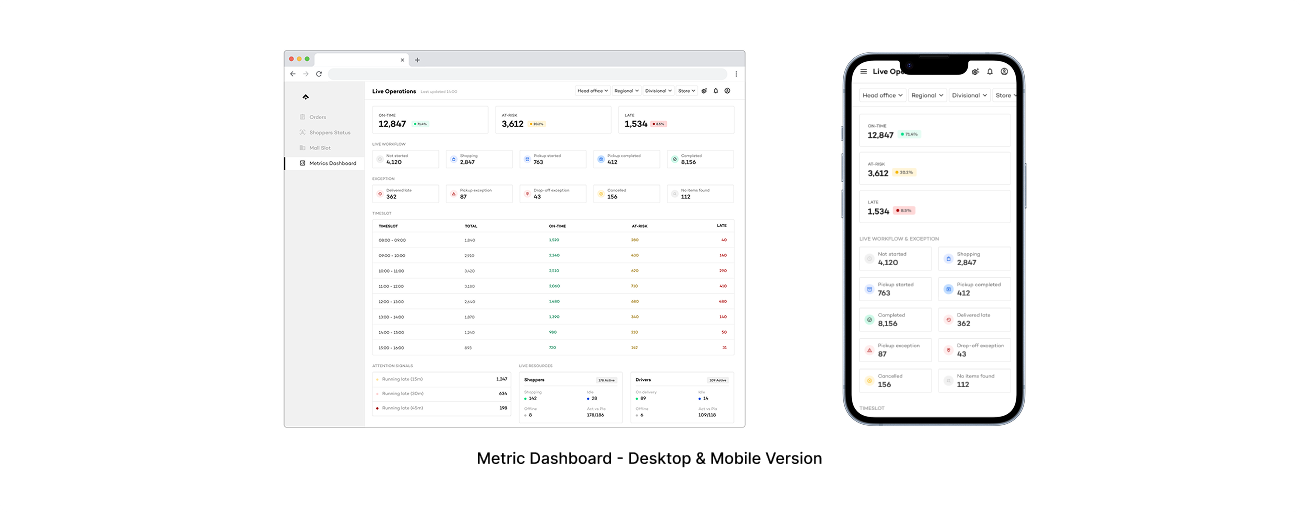
Agents and leads had no high-level view of operational health. To understand what was happening, they had to navigate between modules and mentally assemble the picture.
We designed a live dashboard that surfaces real-time operational signals: orders grouped by workflow state (using the status model), orders grouped by attention need (using the badge model), a timeliness snapshot (on-time, at-risk, late), shopper availability, and mall-level activity. Every number is clickable — clicking “12 Running Late” takes you straight to a filtered order list showing those 12 orders.
The feature originated from a client request, but we designed it to work across any OneCart client. The data structure follows the status/badge model, so it stays consistent regardless of context. Driver availability was scoped for the control tower but full integration depends on delivery partner APIs that are still being negotiated. We pushed for it alongside engineering — it's planned for a later phase.
Role-Based Visibility
All users saw the same interface regardless of role. We introduced role-based visibility — hiding modules and controls that aren't relevant to each role. The principle: an agent doesn't need Mall Slots. A viewer shouldn't see Cancel Order buttons. A store manager needs their store's data, not the entire operation.
Non-applicable actions and modules are hidden entirely, not greyed out. Greyed-out buttons still create cognitive load — people see them and wonder why they can't click.
Beyond module visibility, the system scopes data by access level: national, regional, or store. A client's staff can have read-only access to their own data without seeing other clients' operations.
This is visibility-only for now — no role editing UI. Building role management would have required consensus on permission structures that don't exist yet. Hiding irrelevant modules and actions covers most of the problem without the scope explosion.
Operational Notifications
Agents had no way to be alerted when something needed attention. The only way to know an order was running late was to be looking at the right part of the screen at the right time.
We scoped notifications deliberately narrow for the first phase: surface time-sensitive risks, nothing else. The system notifies when orders cross Running Late thresholds at 15, 30, and 45 minutes. These match escalating urgency levels that ops already uses informally — 15 minutes is a heads-up, 30 needs active attention, 45 is critical.
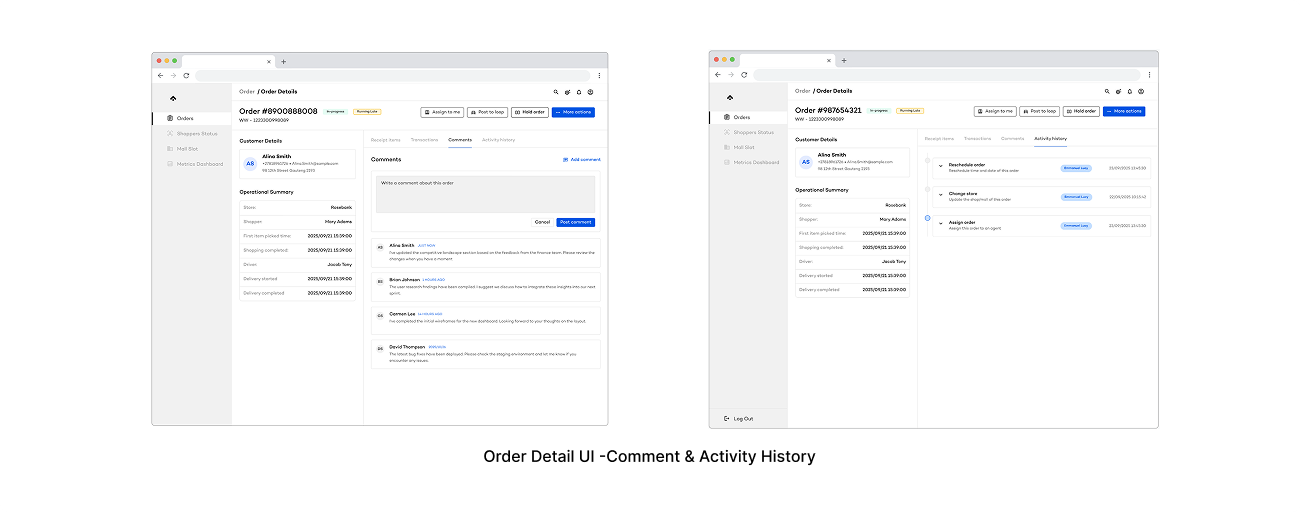
Channels are browser notifications (opt-in) and an in-app notification bell. Clicking a notification takes you to a filtered order view scoped to your region, store, or access level — not a generic “orders are late” message, but the actual orders you need to look at.
No configurable thresholds, no escalation chains, no SMS or email. Fixed thresholds ship faster and establish the pattern. Configurable alerts would need a preferences UI, per-user state management, and operational consensus on what the thresholds mean. That's future work, after the foundation proves out.
Impact
Outcomes
Current state
This is an active project with design and development running in parallel.
What's been validated
The status/badge separation was accepted immediately by engineering — it resolved confusion that had existed since the system was first built. That single decision gave us the foundation for the control tower, the filter redesign, and the order list restructure.
The Phase 1 approach (clarity, efficiency, reliability — no intelligence) was approved by engineering, PM, and business. The control tower design is complete and adaptable across clients. Search and filter overhaul is in active development, directly addressing the top pain points from the survey.
Metrics we'll measure against once the system is live: Page load time and manual refresh frequency. Time to resolve an order. Successful search rate without external tools. Reduction in manual steps. Agent satisfaction. Reduction in errors from unclear statuses or accidental destructive actions.
reflection
Conclusion
What's working
The research earned the redesign scope. Engineering flagged that the system was outgrowing its design, but the heuristic evaluation and survey gave us specific numbers. 60% refreshing constantly. 57% frustrated with search. That evidence made every conversation with PM and business concrete.
The status/badge model unlocked everything else. Once that separation was clear, filters, the control tower, the order list, role-based views — all of it had a foundation. Without that model, each piece would have inherited the old system's ambiguity.
Being the sole designer forced discipline. Every decision had to be documented and justified because I was the one presenting to engineering, PM, and business. No handing off ambiguity.
What's ahead
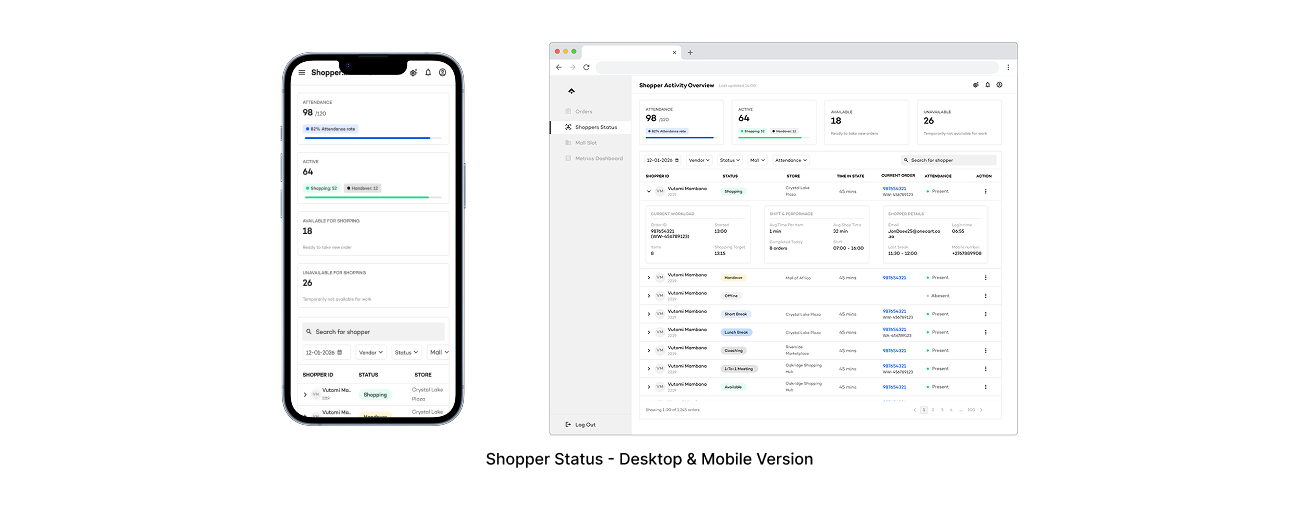
Mall slots and shopper status modules are still in the design queue. Driver data integration for the control tower is a priority being negotiated with delivery partners. Phase 2 possibilities include auto-assignment triggers, advanced filtering with saved views, and admin panel integration — all dependent on Phase 1 shipping successfully and baseline metrics being established.